

 Home
HomeConfiguring OAuth
Using OAuth requires some configuration in the Turnkey Dashboard and your app.Enabling OAuth
Navigate to the Embedded Wallets → Configuration section in the Turnkey Dashboard and enable the OAuth. Note if you have not enabled the Auth Proxy, you will need to do so first. Check out the Getting Started guide for more details.
Client IDs
You can choose to enter your primary client IDs for each OAuth provider in the dashboard
TurnkeyProvider’s config.
Client IDs typically come from the OAuth provider’s developer console. For example, Google client IDs can be found in the Google developer console.
For OAuth2.0 providers, you will need to upload the client ID and secret in
the dashboard. Check out the OAuth2.0 providers section for more details.
Client configuration
If you prefer configuring via code, provide your client IDs throughTurnkeyConfig.authConfig.oAuthConfig, and set an appScheme to complete deep links.
Each provider takes a primaryClientId and an optional secondaryClientIds array. Any secondaryClientIds you pass are registered as additional OIDC audiences on the sub-organization at creation time, which lets a single Turnkey user be authenticated by multiple client IDs (typically used by apps that have both web and mobile versions sharing one identity). You can learn more about Multi-platform OAuth Identities here.
Apple Sign-In on iOS uses the native Apple Sign-In flow, which authenticates against the iOS app’s bundle identifier. On Android, Apple Sign-In uses a web-based OAuth flow that authenticates against the Apple Services ID. To keep iOS and Android signups for the same user compatible, when you set
iosBundleId, it is automatically added as a secondary client ID on the sub-org during Android signups (and vice-versa), so a user who signs up on one platform can still sign in on the other.lib/main.dart
By default, Turnkey hosts the OAuth redirect and origin pages at
https://oauth-redirect.turnkey.com and https://oauth-origin.turnkey.com,
which forward back into your app via the appScheme you configured. If
you’d rather host these yourself, override oauthRedirectUri in your TurnkeyProvider’s config. Whatever URL you set
must match the one registered in the provider’s developer dashboard.App scheme configuration (deep links)
Register your app scheme on each platform to complete the OAuth flow.iOS (Info.plist)
ios/Runner/Info.plist
Android (AndroidManifest.xml)
android/app/src/main/AndroidManifest.xml
myapp with your actual scheme and ensure it matches appScheme in TurnkeyConfig.
Usage
Call the helper for each provider from yourTurnkeyProvider instance: handleGoogleOauth, handleAppleOauth, handleFacebookOauth, handleDiscordOauth, and handleXOauth.
lib/screens/social_logins.dart
Provider details
OAuth providers
- Client ID: Web client ID from the Google developer console, set in the Dashboard or via
OAuthConfig. - In the Google developer console, set the authorized redirect URL to
https://oauth-redirect.turnkey.com/?scheme=YOURAPPSCHEME/and the authorized JavaScript origin tohttps://oauth-origin.turnkey.com/. ReplaceYOURAPPSCHEMEwith theappSchemeyou set inTurnkeyConfig.
Apple
handleAppleOauth uses the native Sign in with Apple flow on iOS devices. For this to work you must:
- Enable the Sign in with Apple capability for your iOS app in Xcode (Signing & Capabilities).
- Enable Sign in with Apple for the app identifier in the Apple Developer dashboard.
handleAppleOauth falls back to a web-based Apple OAuth flow that authenticates against the Apple Services ID. To keep iOS and Android sign-ins linked to the same Turnkey user, configure both serviceId and iosBundleId on AppleOAuthPrimaryClientId. The iosBundleId is automatically registered as a secondary client ID on the sub-org during Android signups (and vice-versa).
Requirements:
- Client IDs: Apple Services ID (Android web flow) and iOS bundle ID (native iOS flow), set via the
OAuthConfig. - In the Apple Developer dashboard, set the Services ID’s return URL to
https://oauth-redirect.turnkey.com/?scheme=YOURAPPSCHEME/and its domain/origin tohttps://oauth-origin.turnkey.com/. ReplaceYOURAPPSCHEMEwith theappSchemeyou set inTurnkeyConfig. This is only required for the Android web-based flow; the native iOS flow doesn’t need it.
handleAppleWebOauth is also exposed but deprecated. It’s kept for
backwards compatibility with older SDK versions and forces the web-based
Apple OAuth flow on all platforms (including iOS), using serviceId as the
audience. Only use it if you specifically need to force the web flow on iOS.- Client ID: set in the Dashboard or via
OAuthConfig. - In the Facebook for Developers dashboard, set the valid OAuth redirect URI to
https://oauth-redirect.turnkey.com/?scheme=YOURAPPSCHEME/and the app domain tohttps://oauth-origin.turnkey.com/. ReplaceYOURAPPSCHEMEwith theappSchemeyou set inTurnkeyConfig.
OAuth2.0 providers
For OAuth providers that exclusively use OAuth2.0 (e.g., X, Discord), you will need to configure a few additional settings in your Turnkey Dashboard. In the Embedded Wallets → Configuration section of the dashboard, head to the OAuth 2.0 tab and click Add Credential.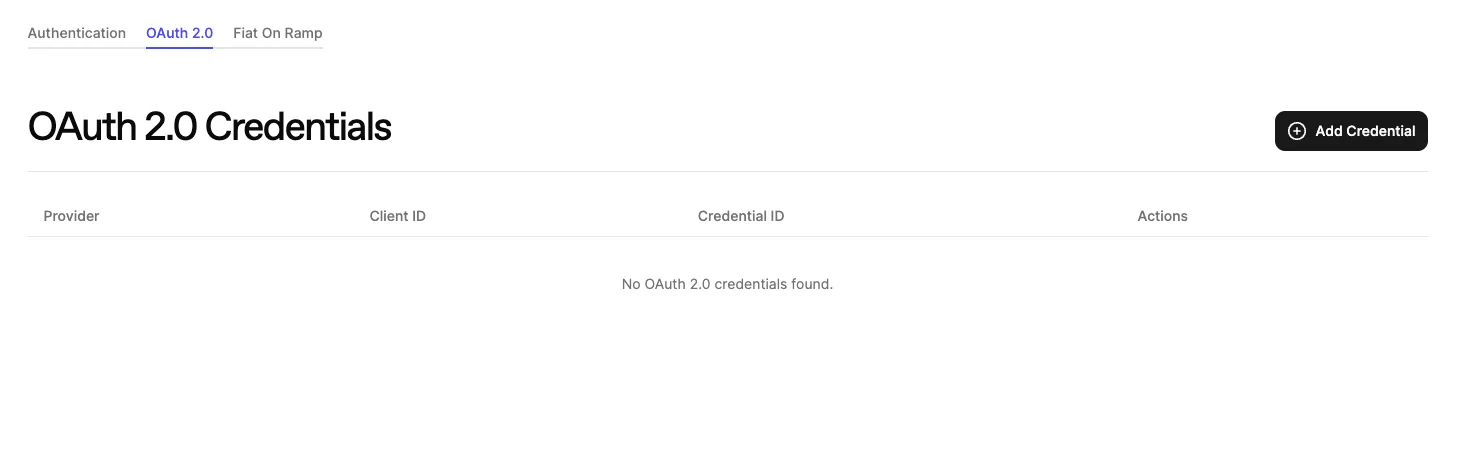
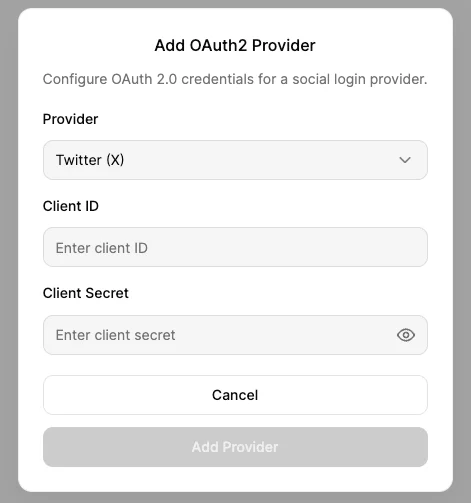
OAuthConfig as shown above.
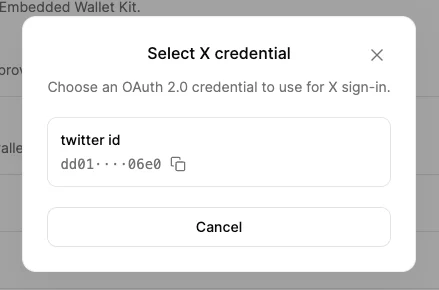
Discord
Requirements:- Client ID: set in Dashboard or via
OAuthConfig. - In the Discord Developer Portal, set the redirect URI to
YOUR_APP_SCHEME://.
X (Twitter)
Requirements:- Client ID: set in Dashboard or via
OAuthConfig. - In the Twitter Developer Portal, set the redirect URI to
YOUR_APP_SCHEME://.